-
2.4.1
-
Creating an MT Works2 Project
Create an MT Developer2 project.
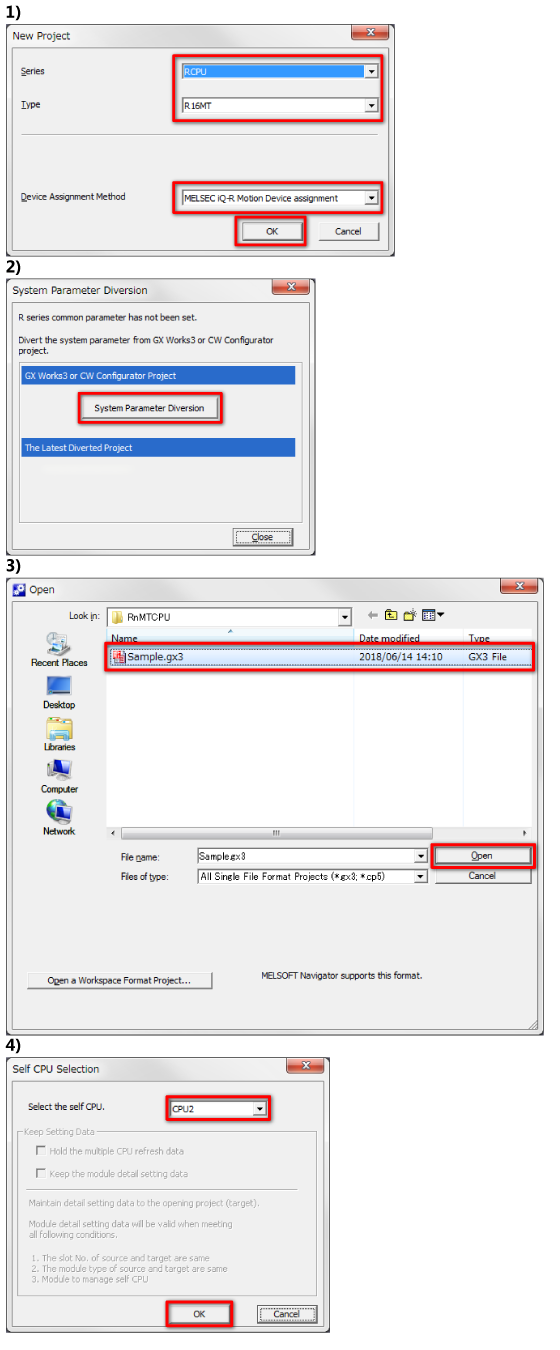
- 1)Start MT Developer2, and select [Project] => [New].
In the new project window, configure the settings as shown in the figure below.
The details of "Q series Motion compatible Device assignment" are explained in section 3.1.
Click the [OK] button to confirm. - 2)The [System Parameter Diversion] window appears.
Click the [System Parameter Diversion] button.
The R series common parameters can be diverted from the GX Works3 project that was created before. - 3)In the [Open] window, select the project saved in section 2.3.3.
Click the [OK] button to confirm. - 4)The [Self CPU Selection] window appears.
Set the CPU No. of the motion CPU module.
Select "CPU2" in this course.
Click the [OK] button to confirm.