
Software Tools NC Monitor2

Taking advantage of the network in a plant, CNC operation status can be monitored from remote locations.
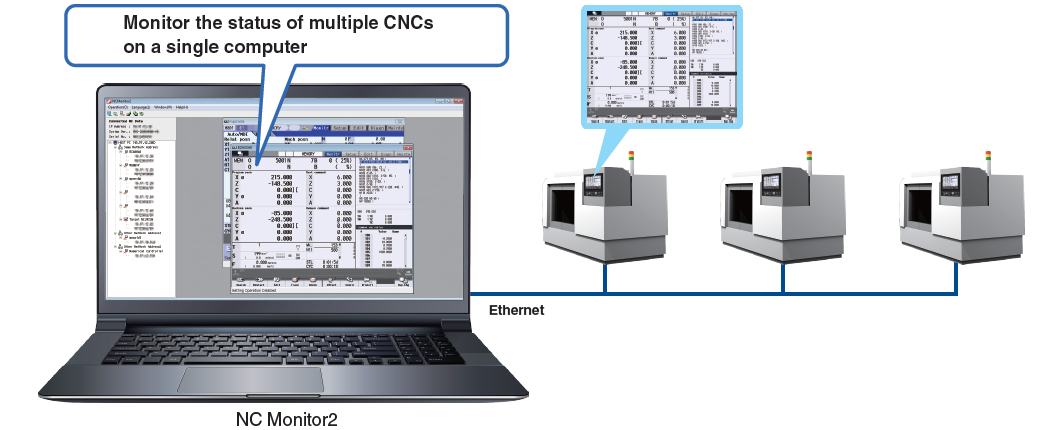
Several CNCs can be connected and monitored simultaneously.
M800VM80VM800M80E80C80M700VM70VM700M70E70
Overview
●How can I monitor a CNC on a computer in the office without visiting the factory?
Easy monitoring with
NC Monitor2!
Functions
- Adopts the same screen structure
The monitoring display is constructed to mirror the CNC display unit.*1
It is possible to select a monitoring screen that is not synchronized with the display of the CNC in operation.
*1.Note that the screen structure of the 10.4-type display is applied when a 15-type or 19-type display is connected. - Limit display/setting operation of CNCs
By setting parameters in a CNC, the availability of displaying and setting using this software can be restricted. - Connectable CNCs are automatically listed
Connectable CNCs in a network group are automatically displayed in a list, and the CNCs can be connected by selecting them.
Specifications
| Supported OS | WindowsⓇ8.1/WindowsⓇ10 Supports 32- and 64-bit OS (WOW64 available for 64-bit) |
|---|---|
| Languages | English/Japanese |
| CNC connections | Supported CNCs: M800V/M80V/M800/M80/E80/C80/M700V/M70V/M700/M70/E70 Series Connection configuration: Ethernet Connectable CNCs: 10 (max.) |
| Precaution | Please use the Remote Monitor Tool for the C70. |